
Google Search Console Setup is one of the smartest moves any website owner or SEO professional can make in 2026. This free powerhouse tool from Google gives you direct insights into how the search giant sees and ranks your site.
What Is Google Search Console?
Google Search Console is Google’s official, no-cost platform designed for website owners, developers, and SEO experts. Formerly known as Google Webmaster Tools, it received a major overhaul in 2018, resulting in a cleaner, more user-friendly interface that delivers deeper insights.
In simple terms, GSC shows you exactly how Google crawls, indexes, and understands your website. Every time Googlebot visits your pages, data flows into GSC. This includes which pages are performing well in search, which keywords are driving impressions, technical issues affecting visibility, and opportunities to improve user experience.
“Google Search Console is your direct communication channel with Google’s search engine.”
By completing a proper Google Search Console Setup, you gain actionable data that helps you make informed decisions instead of guessing what might improve your rankings.
Step-by-Step Google Search Console Setup in 2026
Setting up GSC is straightforward and takes just a few minutes. Here’s exactly how to do it:

- Sign In to Google Search Console Visit search.google.com and log in with your Google account. If you don’t have one, creating a free Gmail account takes seconds.
- Add Your Property Click “Add Property.” Choose between Domain (recommended) or URL Prefix.
- Domain property covers http, https, www, and non-www versions automatically.
- URL Prefix limits tracking to a specific URL path. For most sites, the Domain option provides the most complete picture.
- Verify Ownership Google offers several verification methods: HTML meta tag, DNS record, Google Analytics, Google Tag Manager, or HTML file upload. If you already use Google Analytics on your site, verification is instant with one click. WordPress users can also verify easily through plugins like Yoast SEO or Rank Math.
- Submit Your Sitemap After verification, go to the Sitemaps section and submit your XML sitemap (usually yoursite.com/sitemap.xml). This helps Google discover and prioritize your most important pages faster.
Pro Tip from helpmeinseo.com: Don’t worry if your dashboard looks empty right after setup. It typically takes 2–3 days for meaningful data to appear as Google crawls your site. Patience is key during the initial phase.
Exploring the Main Sections of Google Search Console
Once your Google Search Console Setup is complete, familiarize yourself with these core reports:
- Performance Report: Your primary SEO dashboard showing clicks, impressions, CTR, and average position.
- URL Inspection Tool: Check individual page indexing status, crawl date, and enhancements.
- Coverage Report: See which pages are indexed and why others are excluded.
- Core Web Vitals: Evaluate page experience metrics for mobile and desktop.
- Links Report: Analyze internal and external backlinks.
- Manual Actions: Check for any penalties (this section should ideally show zero issues).
Performance Report: Your SEO Command Center
The Performance report is where the real insights live. It tracks four essential metrics:
- Clicks: How many users visited your site from Google Search.
- Impressions: How often your pages appeared in search results.
- CTR (Click-Through Rate): Clicks divided by impressions. Aim for 3–5% as average; above 5% is excellent.
- Average Position: Your typical ranking spot. Targeting positions 1–10 should be your goal.
Use the date comparison feature to track progress month-over-month. Filter by queries with high impressions but low clicks these represent quick-win opportunities. Improving title tags and meta descriptions often delivers fast CTR boosts.
At helpmeinseo.com, we recommend creating content clusters around high-performing keywords identified in this report. This builds topical authority and compounds your rankings over time.
Coverage Report: Fix Indexing Problems Fast
The Coverage report reveals exactly which pages Google has indexed and which ones it excluded. Categories include Valid, Valid with Warnings, Error, and Excluded.
Common issues include:
- 404 errors (fix with 301 redirects)
- Duplicate or thin content
- Crawl budget limitations
- Robots.txt blocks or noindex tags
Quick Fix Strategy: After resolving an issue, use the URL Inspection Tool and click “Request Indexing.” This often speeds up re-crawling significantly.
Regular monthly audits of the Coverage report prevent small problems from becoming major traffic losses.
Core Web Vitals: Why Page Experience Matters in 2026
Since 2021, page experience has been a confirmed ranking factor. Core Web Vitals measure loading performance, interactivity, and visual stability through three key metrics:
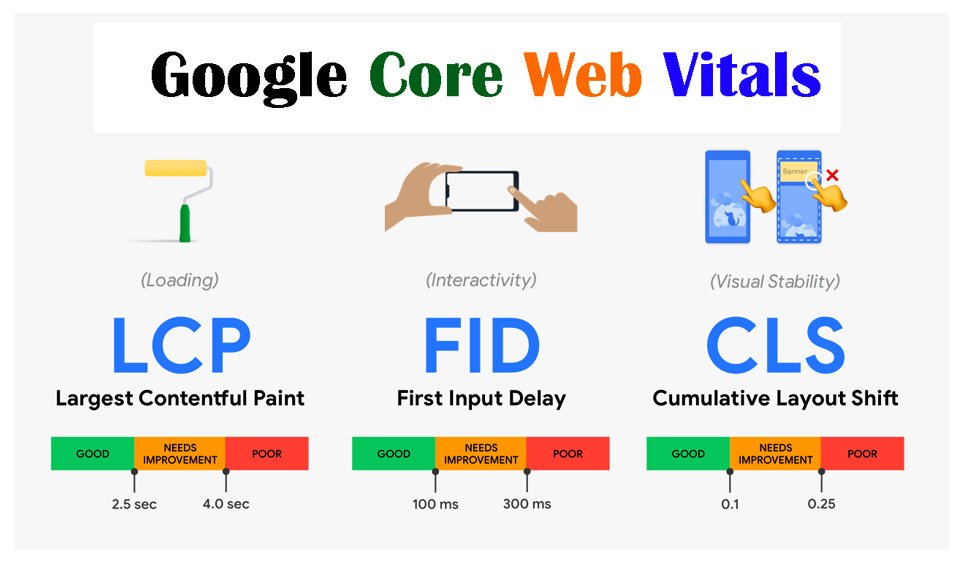
- LCP (Largest Contentful Paint): How quickly the main content loads.
- INP (Interaction to Next Paint): Responsiveness to user interactions.
- CLS (Cumulative Layout Shift): Unexpected layout shifts during loading.
GSC breaks results down by mobile and desktop. Prioritize fixing “Poor” pages first using Google’s PageSpeed Insights for specific recommendations. Even moving pages from Poor to Needs Improvement can produce noticeable ranking improvements.
Links Report: Master Your Backlink and Internal Link Profile
Don’t overlook the Links report. The External Links section shows your backlink profile identify and disavow truly spammy links if necessary. The Internal Links section helps you find “orphan pages” that lack proper internal linking.
Strengthening internal linking improves crawlability and distributes page authority more effectively across your site.
Submitting a Sitemap: Accelerate Indexing
A well-structured sitemap acts as a roadmap for Google. Submit it directly in GSC and ensure it updates automatically when you publish new content. Tools and plugins like Yoast SEO or Rank Math make this effortless on WordPress.
Advanced Growth Strategies Using Google Search Console
Google Search Console Setup is just the beginning. Here are proven tactics we use at helpmeinseo.com:
- Weekly Performance Reviews: Focus on pages ranking in positions 6–15. These are often easiest to push onto page one with targeted optimizations.
- Content Cluster Building: Identify strong keywords and create supporting pillar and cluster content with strategic internal links.
- Coverage Audits: Catch new errors after site updates or plugin changes.
- GSC + GA4 Integration: Connect both tools for a complete view of search visibility and user behavior.
- URL Inspection for New Content: Request indexing immediately after publishing to reduce the usual 2–3 week wait to just days.
The Powerful URL Inspection Tool
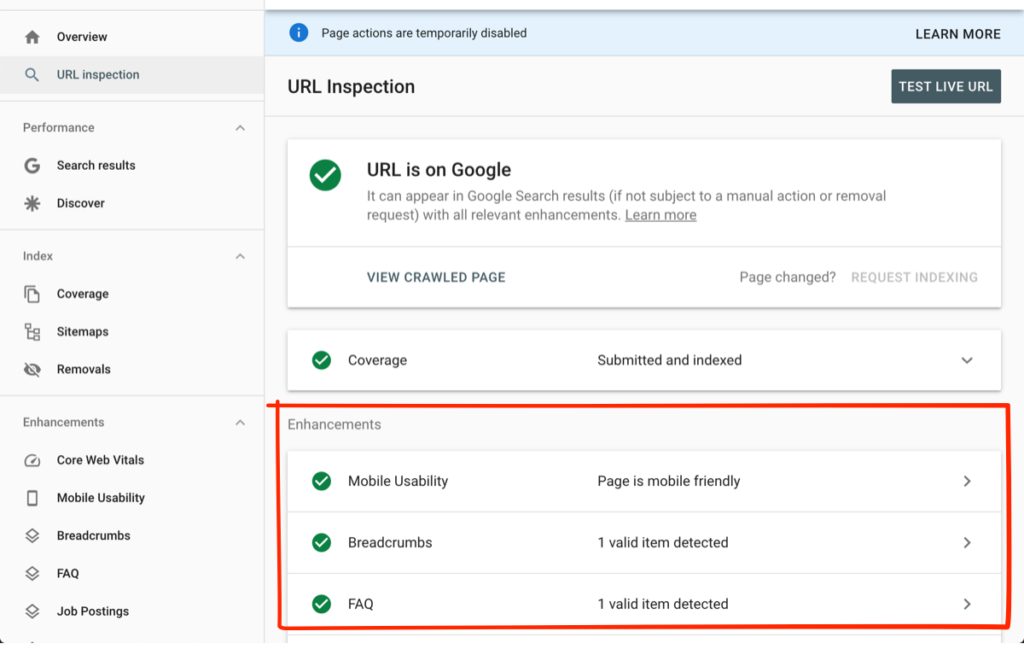
This underrated feature lets you:
- Request indexing for new or updated pages
- Check crawl status and last crawl date
- Verify canonical tags and schema markup
- Confirm mobile-friendliness
Make it a habit to inspect important pages regularly.
Conclusion: Turn GSC into a Weekly SEO Habit
Mastering Google Search Console Setup gives you an unfair advantage in 2026’s competitive search landscape. Consistent monitoring and action on GSC data separate growing websites from stagnant ones.
Start today: Verify your site, submit your sitemap, analyze your Performance report, and fix one Coverage issue. Small, consistent improvements compound into major organic traffic gains.
At helpmeinseo.com, we specialize in turning technical SEO tools like Google Search Console into measurable business growth. Whether you need help with setup, ongoing optimization, or full SEO strategy, our team is here to support you.
Frequently Asked Questions About Google Search Console
Is Google Search Console free?
Yes, completely free with no premium tiers or usage limits.
Do I need both GSC and Google Analytics?
Absolutely. GSC shows search performance while GA4 reveals on-site user behavior. Together they provide the full picture.
Is submitting a sitemap mandatory?
No, but highly recommended especially for new or large sites to speed up crawling and indexing.
How do I verify my site in GSC?
Easiest methods are Google Analytics integration or HTML meta tag. Plugins like Yoast make it simple for WordPress users.
Why isn’t my page indexed?
Common causes include noindex tags, robots.txt blocks, thin content, or crawl errors. Check the Coverage report for details.
My average position is around 11. What should I do?
This is a prime opportunity zone. Optimize content, improve internal links, and target featured snippets to push onto page one.
How often should I check Google Search Console?
Weekly for Performance reports, monthly for Coverage and Core Web Vitals, and immediately after major site changes or algorithm updates.
What should I do about spammy backlinks?
Google usually ignores low-quality links automatically. Use the Disavow Tool sparingly and only for clearly manipulative links.
Is GSC useful for local SEO?
Yes. Filter queries by location-specific terms to refine your local content and Google Business Profile strategy.
How long until I see data on a new website?
Expect 4–8 weeks for meaningful data on brand-new sites. Focus on quality content and proper internal linking during this period.