



SEO mistakes to avoid are the hidden traps that silently drain your website’s organic traffic, even if you’re putting in effort to create content and build links. In 2026, with Google’s core updates emphasizing helpful, people-first content, mobile experience, and user intent more than ever, these mistakes can completely kill your rankings and visibility.
What Are SEO Mistakes to Avoid and How Do They Work?
SEO (Search Engine Optimization) is the practice of making your website easier for search engines like Google to understand, crawl, and rank highly in search results. When done right, it brings free, targeted visitors.
SEO mistakes to avoid happen when your site does things that frustrate users or confuse search engines. Google’s algorithms (especially after 2025-2026 core updates) prioritize helpful content, fast loading times, mobile-friendliness, and genuine value over tricks.
These mistakes “kill” traffic because:
- Search engines deprioritize or ignore your pages.
- Users bounce away quickly (high bounce rate hurts rankings).
- Your site fails Core Web Vitals or other quality signals.
Important fundamentals for beginners:
- Search Intent — What the user really wants (informational, navigational, transactional, or commercial investigation).
- E-E-A-T — Experience, Expertise, Authoritativeness, and Trustworthiness.
- User Experience (UX) — Fast, easy-to-navigate, mobile-friendly sites win.
- Content Quality — Original, in-depth, and helpful beats thin or AI-spun text.
- Technical Health — Your site must be crawlable and indexable.
Step-by-Step Guide to Getting Started with Fixing SEO Mistakes
- Audit your site — Use free tools (listed later) to find issues.
- Fix technical basics — Speed, mobile, security (HTTPS).
- Understand your audience — Research keywords with intent.
- Create or update content — Make it better than competitors.
- Monitor and iterate — Check performance weekly.
- Build good habits — Avoid shortcuts like buying links or keyword stuffing.
The 10 SEO Mistakes That Kill Your Website Traffic (and How to Fix Them)
1. Ignoring Search Intent
You target a keyword but create content that doesn’t match what searchers want. Example: Ranking for “best running shoes” with a product list when users want comparison reviews and buying guides.
Why it kills traffic: Google sees high bounce rates and low time-on-page, pushing your content down.
How to fix:
- Search the keyword yourself and analyze top 10 results.
- Ask: Is the intent informational (learn), navigational (find a site), or transactional (buy)?
- Step-by-step: Use Google’s “People Also Ask” and related searches to shape your outline.
- Actionable tip: Create a simple intent map column 1: Keyword, column 2: Intent type, column 3: What top pages offer.
2. Publishing Low-Quality, Thin, or Generic Content
Short 300-word posts, AI-generated fluff without editing, or copied ideas.
Why it kills traffic: Google’s Helpful Content system (now integrated into core rankings) demotes unhelpful pages site-wide.
How to fix:
- Aim for in-depth content (1500+ words for competitive topics) with real examples, images, lists, and personal insights.
- Add unique value: Original data, case studies, step-by-step screenshots, or your experience.
- Checklist: Does it answer the query completely? Is it better than page 1 results? Would you bookmark/share it?
Real example: A blog post titled “How to Lose Weight” that just says “eat less, move more” gets crushed. One with meal plans, workout videos, progress trackers, and science-backed tips ranks and retains visitors.
3. Slow Website Speed
Pages taking 3+ seconds to load, especially on mobile.
Why it kills traffic: Speed is a direct ranking factor and affects Core Web Vitals (Largest Contentful Paint, Interaction to Next Paint, etc.).
How to fix:
- Compress images (use tools like TinyPNG or WebP format).
- Enable browser caching and minify CSS/JavaScript.
- Choose good hosting and use a CDN (Content Delivery Network).
- Step-by-step test: Go to PageSpeed Insights, fix red flags one by one, retest.
Pro tip: Aim for under 2.5 seconds load time. Even 1-second improvement can boost conversions significantly.
4. Poor Mobile Optimization (Not Mobile-Friendly)
Site looks broken on phones tiny text, horizontal scrolling, or overlapping elements.
Why it kills traffic: Mobile-first indexing means Google primarily uses the mobile version for ranking. Over 60% of searches are mobile.
How to fix:
- Use responsive design (most modern themes like WordPress do this automatically).
- Test with Google’s Mobile-Friendly Test tool.
- Ensure buttons are large enough to tap and text is readable without zooming.
5. Keyword Stuffing or Over-Optimization
Forcing the keyword unnaturally many times or in awkward places.
Why it kills traffic: Reads robotic, hurts user experience, and Google penalizes manipulative tactics.
How to fix:
- Use the keyword naturally in title, headings, first paragraph, and throughout (density ~1-2%).
- Focus on related terms and semantic keywords (LSI).
- Read your content aloud if it sounds forced, rewrite.
Actionable framework: Primary keyword once in title/H1, naturally in intro and conclusion, variations elsewhere.
6. Weak or Missing On-Page SEO Elements
No optimized title tags, meta descriptions, headings, or alt text for images.
Why it kills traffic: Search engines can’t understand your page’s topic easily; users don’t click through from results.
How to fix:
- Title tag: 50-60 characters, include keyword early.
- Meta description: 150-160 characters, compelling call-to-action.
- Use H1 (one per page), H2/H3 for structure.
- Add descriptive alt text to images (helps accessibility and image search).
Example: Bad title: “Shoes” → Good: “10 Best Running Shoes for Beginners in 2026 | Reviews & Buying Guide”
7. Duplicate Content Issues
Same or very similar content on multiple pages/URLs, or copied from elsewhere.
Why it kills traffic: Google picks one version to rank and ignores others; can dilute authority.
How to fix:
- Use 301 redirects for moved pages.
- Add canonical tags to tell Google the preferred version.
- Create unique content for each page.
- Tools like Siteliner or Google Search Console help spot duplicates.
8. Poor Internal Linking Structure
No links between your pages or messy navigation.
Why it kills traffic: Search engines can’t discover all your content; users get stuck and leave.
How to fix:
- Link related articles naturally (e.g., from a blog post to a relevant guide).
- Create topic clusters: Pillar page (broad) linking to cluster content (specific).
- Keep URL structure clean: example.com/category/post-slug (not example.com/?p=123).
Practical tip: Aim for 3-5 internal links per post. Use descriptive anchor text like “improve site speed” instead of “click here.”
9. Neglecting Technical SEO Basics
No XML sitemap, broken links, no HTTPS, crawl errors, or poor robots.txt.
Why it kills traffic: Search engines can’t crawl or index your site properly.
How to fix:
- Submit sitemap via Google Search Console.
- Fix broken links regularly (use plugins or tools).
- Ensure HTTPS is enabled.
- Monitor crawl errors in Search Console.
Beginner step: Set up Google Search Console and fix all “Not indexed” or error reports.
10. Ignoring Analytics and Not Updating Old Content
Publishing once and forgetting; never checking performance or refreshing outdated posts.
Why it kills traffic: Content becomes stale; you miss opportunities to fix what’s not working.
How to fix:
- Review top pages monthly and update with fresh info, new stats, better images.
- Delete or redirect truly useless thin content.
- Use data to double down on what works.
Real use case: A 2023 “best tools” post updated in 2026 with new screenshots and 2026 recommendations can regain or exceed previous traffic.
Best Practices and Strategies for SEO Success in 2026
- Create people-first content — Write for humans, optimize for search.
- Focus on E-E-A-T — Show your expertise with author bios, sources, and real experience.
- Build topical authority — Cover a niche deeply with clusters of related content.
- Optimize for AI overviews — Answer questions clearly and concisely (featured snippets style).
- Combine with good UX — Fast, intuitive design keeps visitors longer.
- Avoid black-hat tactics — No paid links, cloaking, or hidden text.
Actionable checklist for every new page:
- Keyword researched with intent?
- Title & meta optimized?
- Mobile-friendly and fast?
- Headings structure logical?
- Internal + external links added?
- Images optimized with alt text?
- Content unique and helpful?
Top Tools and Resources for Beginners (and How to Use Them)
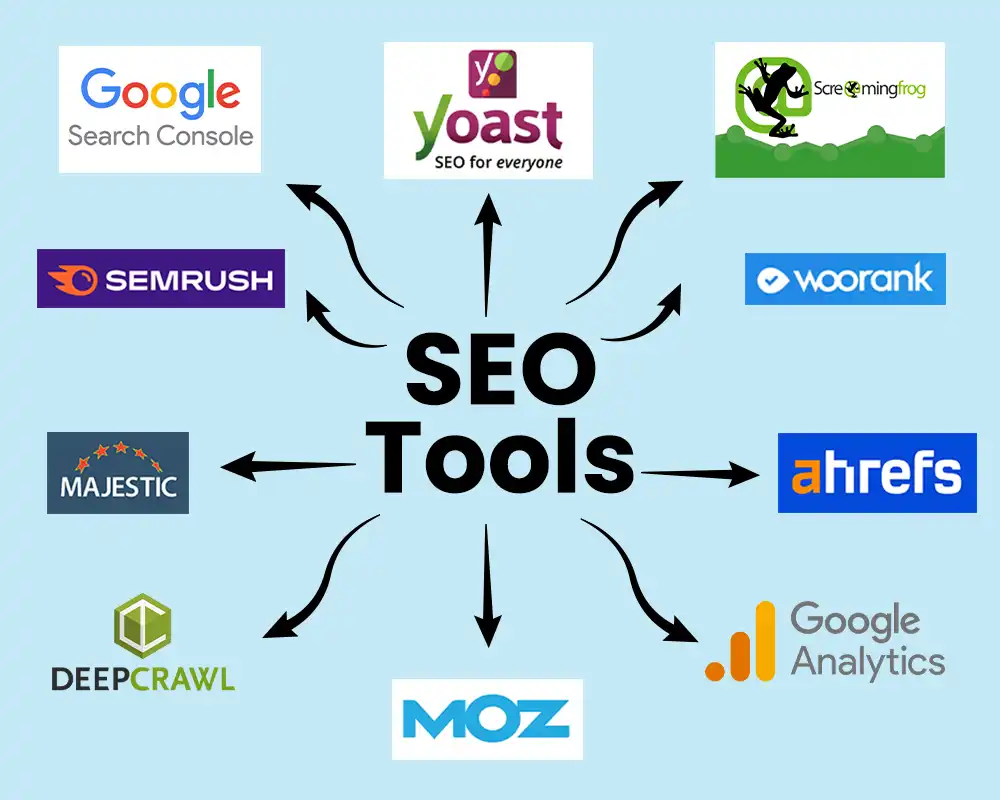
Here are the most practical tools in 2026. Start with free ones:
- Google Search Console (Free) What it does: Shows which keywords bring traffic, indexing status, crawl errors, and Core Web Vitals. When to use: Every week submit sitemaps, fix issues, track performance. Beginner tip: Connect your site and check the “Performance” report to see real search queries.
- Google Analytics 4 (Free) What it does: Tracks visitor behavior, bounce rates, time on page, and conversions. When to use: To understand if your SEO traffic actually engages or leaves quickly. Tip: Set up goals for key actions like form submissions.
- Google PageSpeed Insights (Free) What it does: Scores your page speed and gives specific fix suggestions. When to use: Before and after optimizing images or code.
- Ahrefs Webmaster Tools or SEMrush Free Version (Limited free tiers) What they do: Keyword research, backlink analysis, site audits. When to use: For competitor analysis and finding keyword opportunities. Beginner use: Enter your site or competitors to see gaps.
- Ubersuggest or AnswerThePublic (Free tiers) What they do: Generate keyword ideas and questions people ask. When to use: During content planning to match search intent.
Additional free resources: Google’s SEO Starter Guide, PageSpeed Insights, Mobile-Friendly Test, and structured data testing tool.
Tips to Improve Results and Avoid Future Mistakes
- Update content regularly Google loves fresh, maintained sites.
- Add multimedia (images, videos, infographics) to boost engagement.
- Build natural backlinks by creating shareable, helpful resources.
- Track progress monthly, not daily SEO takes time (weeks to months).
- Stay patient and consistent focus on value over tricks.
Key Takeaways Summary:
- Prioritize user intent and quality content above all.
- Fix technical issues (speed, mobile, indexing) first they’re foundational.
- Use free Google tools to monitor and improve.
- Avoid shortcuts; build for the long term.
- Regularly audit and update your site.
By avoiding these 10 SEO mistakes, you’ll not only stop losing traffic but start gaining sustainable, high-quality visitors in 2026 and beyond. SEO is a marathon, not a sprint consistent improvement wins.
Start today: Pick one mistake from this list that applies to your site, fix it this week, and measure the difference. Your future traffic will thank you!
If you have a specific page or site in mind, audit it against this guide and implement the fixes. Feel free to bookmark this as your go-to reference for SEO mistakes to avoid.
Frequently Asked Questions
Q1: What are the biggest SEO mistakes to avoid in 2026?
The top ones include ignoring search intent, publishing thin or low-quality content, slow site speed, poor mobile experience, keyword stuffing, weak on-page SEO, duplicate content, bad internal linking, technical issues (like missing sitemaps), and not updating old content. These directly hurt rankings due to Google’s focus on helpful, people-first content and Core Web Vitals.
Q2: How long does it take to see results after fixing SEO mistakes?
Most beginners notice improvements in 2–8 weeks after fixes, but significant traffic growth can take 3–6 months. SEO is a long-term process consistent updates and monitoring speed up results.
Q3: Do I need paid tools to fix these SEO mistakes?
No. Start with completely free tools: Google Search Console, Google Analytics 4, PageSpeed Insights, and Mobile-Friendly Test. These are enough for beginners to audit, fix, and track progress effectively.
Q4: Is AI-generated content still okay in 2026?
Yes, as long as it’s helpful, original, well-edited, and adds real value with your expertise. Google does not ban AI content it penalizes low-quality or unhelpful content regardless of how it’s created.
Q5: Should I delete old low-performing posts?
Only if they are very thin or harmful. Better options: update them with fresh information, new images, and better structure, or add a 301 redirect to a stronger related page. This preserves any existing authority.
Q6: What is the fastest SEO mistake to fix for quick wins? Improving page speed and mobile-friendliness often gives the quickest boost. Use PageSpeed Insights to identify issues and fix images, enable compression, and ensure responsive design.



Leave a Comment