


Technical SEO checklist is your website’s behind-the-scenes foundation. It ensures search engines like Google can find, understand, and rank your pages effectively. Without it, even the best content may stay invisible.
Think of technical SEO like building a house: on-page and content SEO are the furniture and paint, but technical SEO is the solid structure, plumbing, and electricity. If the foundation is weak, the whole house suffers.
In 2026, technical SEO remains essential. Google uses mobile-first indexing, prioritizes Core Web Vitals, and rewards sites that are fast, secure, crawlable, and user-friendly.
What Is Technical SEO and How Does It Work?
Technical SEO optimizes your website’s infrastructure so search engine crawlers (bots like Googlebot) can:
- Crawl — Discover and navigate your pages.
- Index — Store your pages in their database.
- Understand — Comprehend content, structure, and relationships.
- Rank — Deliver your pages to users when relevant.
Simple Analogy
Imagine Google as a librarian visiting your bookstore. Technical SEO ensures:
- The door is open (crawlability).
- Books are on shelves in logical order (site architecture).
- Signs are clear (structured data and internal links).
- The store is well-lit and comfortable (speed and mobile-friendliness).
If the librarian trips over boxes (broken links) or finds the store too slow and dark (poor Core Web Vitals), they leave without recommending it.
How it works in practice (2026 context):
- Google primarily crawls your mobile version (mobile-first indexing).
- It evaluates Core Web Vitals (real-user speed and stability metrics).
- It prefers secure (HTTPS), fast, and accessible sites.
- AI-driven search and answer engines reward clear, structured content.
Good technical SEO = more pages indexed → better visibility → higher organic traffic.
Important Fundamentals Beginners Must Understand
Before diving into fixes, grasp these core ideas:
1. Crawling vs. Indexing
- Crawling: Bots follow links to discover pages.
- Indexing: Google decides to store and potentially rank the page.
- Not all crawled pages get indexed (e.g., thin content or duplicates).
2. Mobile-First Indexing
Since 2019 (fully rolled out), Google uses your mobile site as the primary version for ranking. Desktop is secondary. Ensure mobile and desktop content match.
3. Core Web Vitals (Key User Experience Signals)
Google measures real-user experience with three metrics (updated in 2026, with emphasis on INP for interactivity):
- LCP (Largest Contentful Paint): How fast the main content loads. Aim for under 2.5 seconds.
- INP (Interaction to Next Paint): How responsive the page feels when users click/tap. Aim for under 200 ms.
- CLS (Cumulative Layout Shift): How much the page shifts unexpectedly. Aim for under 0.1.
Poor scores can hurt rankings even with great content.
4. HTTPS and Security
All sites should use HTTPS (secure padlock). It’s a ranking factor and builds user trust.
5. Site Architecture and Internal Linking
A logical hierarchy (homepage → categories → subpages) helps crawlers and users. Internal links pass “authority” like roads connecting cities.
6. Duplicate Content and Canonical Tags
Same content on multiple URLs confuses Google. Use canonical tags to point to the “master” version.
Key Takeaway: Technical SEO isn’t “set it and forget it.” It’s ongoing maintenance, especially as your site grows or you add new features (like JavaScript-heavy apps).
Step-by-Step Guide to Get Started with Your Technical SEO Checklist

Follow this practical, beginner-friendly process. Start small focus on one section per week.
Step 1: Run a Full Website Audit
- Go to Google Search Console (free set it up if you haven’t).
- Check Coverage report for crawl/index errors.
- Review Core Web Vitals and Mobile Usability reports.
- Use a crawler tool (see Tools section) to scan your entire site.
Action: Fix all “Errors” first (e.g., 404s, server errors), then “Warnings.”
Step 2: Fix Crawlability Issues
- Create/update robots.txt (tells bots what NOT to crawl, e.g., admin pages).
- Example: Allow all pages but block /admin/ and /private/.
- Generate and submit an XML Sitemap (list of important URLs).
- Submit via Google Search Console.
Real Example: A blog with 500 posts had orphan pages (no internal links). After adding sitemap and internal links from category pages, indexed pages increased by 40%.
Step 3: Optimize Site Speed and Core Web Vitals
- Test with Google PageSpeed Insights.
- Compress images (use WebP format).
- Enable browser caching and minify CSS/JavaScript.
- Use a fast hosting provider.
- For WordPress: Install lightweight themes and caching plugins.
Actionable Tip: Prioritize above-the-fold content. Lazy-load images below the fold.
Step 4: Ensure Mobile-Friendliness
- Use responsive design (one URL adapts to all devices).
- Test with Google’s Mobile-Friendly Test tool.
- Make buttons/tap targets at least 48×48 pixels.
- Keep content parity (don’t hide text on mobile).
Step 5: Improve Site Structure and Indexing
- Use clean, descriptive URLs (e.g., yoursite.com/technical-seo-checklist instead of yoursite.com/?p=123).
- Implement breadcrumb navigation.
- Add structured data (Schema markup) for rich results (stars, FAQs, etc.).
- Fix broken links and set up proper 301 redirects for moved/deleted pages.
- Use canonical tags for duplicates (e.g., www vs non-www, HTTP vs HTTPS).
Step 6: Secure and Monitor
- Install SSL certificate (most hosts provide free via Let’s Encrypt).
- Monitor for security issues in Search Console.
- Regularly check log files (advanced) or use tools for crawl behavior.
Step-by-Step Checklist Summary (Copy and use!):
- Set up Google Search Console & Bing Webmaster Tools
- Submit XML Sitemap
- Optimize robots.txt
- Test and improve Core Web Vitals (mobile first)
- Ensure responsive design + content parity
- Fix all broken links and redirects
- Implement HTTPS everywhere
- Add structured data where relevant
- Improve internal linking (aim for 3-10 relevant links per page)
- Audit for duplicate/thin content
Repeat monthly for maintenance.
Best Practices and Strategies for 2026
- Prioritize Mobile: Test everything on real mobile devices, not just emulators.
- Focus on User Experience: Fast + stable + intuitive = better rankings and conversions.
- JavaScript SEO: If your site uses React/Vue, ensure server-side rendering or pre-rendering so bots see content.
- E-commerce Specific: Handle faceted navigation carefully (use noindex or canonicals for filter pages to avoid crawl budget waste).
- AI Readiness: Clear structure and schema help AI overviews/summaries cite your site accurately.
- Crawl Budget Optimization: For large sites (>10,000 pages), prioritize important pages and block low-value ones.
Strategy Framework:
- Audit → 2. Prioritize high-impact fixes (speed, mobile, errors) → 3. Implement → 4. Monitor in Search Console → 5. Iterate.
Common Mistakes Beginners Make (and How to Avoid Them)
- Ignoring Mobile: Building desktop-first. Fix: Always design mobile-first.
- Overlooking Core Web Vitals: Focusing only on keywords. Fix: Test every major page update.
- Blocking Important Resources in robots.txt: Accidentally hiding CSS/JS. Fix: Test with “Fetch as Google” in Search Console.
- Poor URL Structure: Long, messy URLs with parameters. Fix: Keep short, readable, keyword-inclusive.
- Forgetting Redirects: Deleting pages without 301s, causing 404 errors. Fix: Always redirect to similar relevant page.
- Duplicate Content Without Canonicals: www and non-www versions both indexed. Fix: Set preferred domain in Search Console.
- Thinking Technical SEO Is “One-Time”: Sites change; issues creep in. Fix: Schedule monthly audits.
- Neglecting Internal Linking: Creating isolated pages. Fix: Use tools to find orphan pages and link them.
Real Use Case: A small e-commerce store ignored speed. After compressing images and enabling caching, load time dropped from 6s to 1.8s → Core Web Vitals passed → traffic up 35% in 3 months.
Practical Examples and Real Use Cases
- Blog Example: You write “Technical SEO Checklist for Beginners.” Ensure the URL is /technical-seo-checklist, add FAQ schema, internal links to related posts like “Core Web Vitals Guide,” and optimize images.
- E-commerce: Product pages should have unique titles, schema for Product/Reviews, fast loading (critical for conversions), and canonicals for variant URLs.
- Local Business: Ensure consistent NAP (Name, Address, Phone), mobile-friendly contact form, and schema for LocalBusiness.
Tips to Improve Results with Technical SEO Checklist
- Start with low-hanging fruit: Fix errors in Search Console first.
- Combine with on-page SEO (titles, headings, content quality).
- Track progress: Monitor indexed pages, organic traffic, and bounce rate in Google Analytics.
- Make it habitual: Set calendar reminders for audits.
- For faster results: Focus on your most important 20% of pages (Pareto principle).
- Stay updated: Google changes algorithms check Search Central blog regularly.
Pro Tip: After fixes, request indexing for key pages in Search Console to speed up visibility.
Top Tools and Resources for Technical SEO (2026)
Use these to make your technical SEO checklist easier:
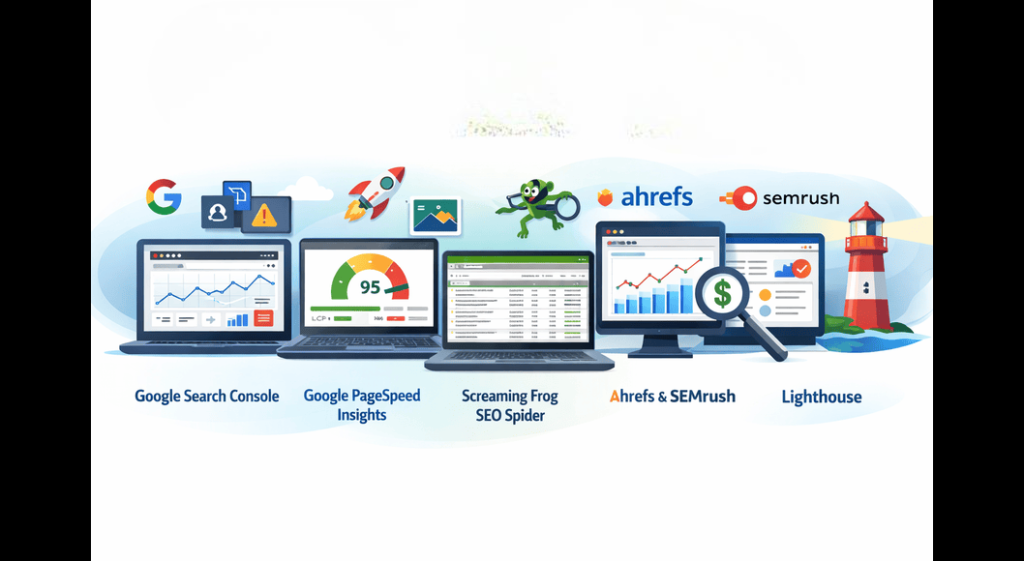
- Google Search Console (Free) The #1 must-have. Monitors crawl errors, indexing, Core Web Vitals, mobile usability, and sitemaps. Use it daily/weekly to spot issues early.
- Google PageSpeed Insights (Free) Tests speed and Core Web Vitals. Gives specific recommendations (e.g., “Optimize this image”). Run on mobile and desktop.
- Screaming Frog SEO Spider (Free for <500 URLs, paid for more) Desktop crawler that acts like Googlebot. Finds broken links, duplicate titles, missing meta, site structure issues. Excellent for audits.
- Ahrefs or SEMrush (Paid, with free trials/limited versions) All-in-one: Site audits, backlinks, keyword research, and technical issue detection. Great for ongoing monitoring and competitor analysis.
- Lighthouse (Free, built into Chrome DevTools) Audits performance, accessibility, best practices, and SEO. Run it directly in your browser for quick insights.
How Beginners Should Use Them:
- Weekly: Search Console + PageSpeed Insights.
- Monthly: Full crawl with Screaming Frog.
- As needed: Ahrefs/SEMrush for deeper audits.
Other helpful free resources:
- Google’s Search Central Documentation (developers.google.com/search)
- Web.dev (for Core Web Vitals guides)
- Bing Webmaster Tools (extra insights)
Key Takeaways and Final Checklist
Technical SEO checklist success comes from consistency, not perfection. Focus on crawlability, speed, mobile experience, security, and structure.
Ultimate Beginner Checklist (2026 Edition):
- Crawlability: robots.txt + XML Sitemap submitted
- Indexing: No major errors in Search Console
- Performance: Core Web Vitals passing (LCP <2.5s, INP <200ms, CLS <0.1)
- Mobile: Responsive + content parity
- Security: HTTPS everywhere
- Structure: Clean URLs, breadcrumbs, internal links, schema
- Maintenance: Monthly audits
Implement even half of this guide, and you’ll see improvements. Your site will be more discoverable, user-friendly, and ready for 2026’s search landscape.
Start today: Open Google Search Console, run one audit, and fix three issues. Small consistent actions compound into big ranking gains.
Frequently Asked Questions (FAQs)
1. What is a technical SEO checklist?
A technical SEO checklist is a list of important behind-the-scenes optimizations that help search engines crawl, index, and rank your website effectively. It includes fixing site speed, mobile-friendliness, crawl errors, structured data, and more.
2. Is technical SEO important for beginners in 2026?
Yes! Even in 2026, technical SEO remains the foundation of good SEO. Without it, your great content may never appear in Google search results. Good technical SEO improves visibility, user experience, and rankings.
3. How often should I do a technical SEO audit?
Beginners should perform a full technical SEO audit once a month. After the first major fixes, you can reduce it to once every 6–8 weeks, but always check Google Search Console weekly for new errors.
4. Do I need to pay for tools to do technical SEO?
No. You can start completely free using Google Search Console, Google PageSpeed Insights, Lighthouse, and the free version of Screaming Frog. Paid tools like Ahrefs or SEMrush are helpful later when your site grows.
5. What is the most important part of technical SEO for beginners?
The top priorities for beginners are:
- Fixing crawl/index errors in Google Search Console
- Improving Core Web Vitals (especially page speed)
- Making the site mobile-friendly
- Submitting a proper XML sitemap
6. How long does it take to see results from technical SEO?
You may see indexing improvements in 1–4 weeks. Ranking improvements usually appear in 1–3 months, depending on your site’s age, competition, and how many issues you fix.
7. What is the difference between technical SEO and on-page SEO?
Technical SEO focuses on the website’s infrastructure (speed, crawlability, mobile experience, security). On-page SEO focuses on content, titles, headings, keywords, and readability. Both are equally important.
8. Should I worry about JavaScript SEO as a beginner?
Not immediately. Focus first on basic technical SEO (speed, mobile, sitemap, errors). Once your site is clean, then check if your JavaScript content loads properly for Googlebot.

Leave a Comment