



Add me to search in Google – if you’ve ever wondered why your name doesn’t pop up in search results, you’re not alone. In today’s digital-first world, establishing a visible online identity is crucial for professionals, freelancers, entrepreneurs, and anyone aiming to connect with opportunities. At HelpMeInSEO.com, we specialize in helping individuals and businesses enhance their visibility on search engines. This in-depth guide will walk you through proven strategies to add yourself to Google search, from creating a Google People Card to optimizing your personal brand. Whether you’re new to SEO or looking to refine your approach, we’ll cover everything with practical tips, avoiding technical jargon, and focusing on actionable steps.
Table of Contents
- Understanding What It Means to Add Yourself to Google Search
- The Importance of Appearing in Google Results
- A Simple Overview of How Google Search Operates
- Starting with Your Google Account: The Foundation
- Introducing Google People Cards: Your Quick Path to Visibility
- Benefits of Using a Google People Card
- Step-by-Step Instructions to Create Your Google People Card
- Tips for Optimizing Your Google People Card
- Alternative Methods to Boost Your Google Presence
- Building a Personal Website
- Enhancing Your Social Media Profiles
- Utilizing Online Directories and Listings
- Personal SEO Strategies: Elevate Your Discoverability
- Avoiding Common Pitfalls in Building Your Online Profile
- Timeline for Seeing Results: What to Expect
- How to Monitor Your Google Search Presence
- Advanced Tips for Long-Term SEO Success
- Case Studies: Real-World Examples of Success
- Conclusion: Take Charge of Your Digital Identity
- Frequently Asked Questions
Understanding What It Means to Add Yourself to Google Search
When people talk about wanting to “add me to search in Google,” they’re referring to making their personal or professional details discoverable through Google’s vast database. This isn’t about hacking the system or paying for ads; it’s about creating accessible, public content that Google can index and display. For instance, this could include a dedicated profile card, your website, or linked social accounts that appear prominently in results.
At its core, adding yourself involves feeding Google’s algorithms with relevant data about you. This process ensures that when potential employers, clients, or contacts search your name, they find accurate, positive information. In an era where over 90% of recruiters use Google to vet candidates, mastering this can significantly impact your career and networking prospects.
The Importance of Appearing in Google Results
Why bother with efforts to add me to search in Google? The benefits extend far beyond vanity. First, it shapes initial perceptions: Imagine a hiring manager searching your name and finding a polished profile versus nothing at all the former builds trust instantly.
Second, it strengthens your personal branding. By curating what shows up, you highlight achievements, skills, and values, turning search results into a dynamic resume. Third, it unlocks doors to new ventures, such as freelance gigs or collaborations, as people can easily find and contact you.
Finally, it empowers you to manage your story. Without proactive steps, outdated or irrelevant info might dominate, potentially harming your reputation. At HelpMeInSEO.com, we’ve seen clients transform their careers by prioritizing this one freelancer reported a 40% increase in inquiries after optimizing their search presence.
A Simple Overview of How Google Search Operates
To effectively add me to search in Google, grasp the basics of its mechanics. Google employs automated programs known as crawlers that scan the web continuously, following hyperlinks to uncover fresh content.
Once discovered, this data enters Google’s index a colossal repository where information is sorted and analyzed. When a query is entered, Google pulls from this index, ranking results based on relevance, authority, and user experience factors like mobile-friendliness and load speed.
Key takeaway: To appear, produce content that’s publicly available and optimized. This could be a blog post, profile, or page that includes your name and details. Understanding this flow helps you strategically place information where crawlers can access it easily.
Starting with Your Google Account: The Foundation
Every journey to add me to search in Google starts with a Google Account, which you probably already own if you use Gmail or YouTube. While the account remains private by default, you can selectively make elements public to aid indexing.
Begin by logging in and reviewing your profile settings. Update your full name, add a profile picture, and enable features like Web & App Activity, which helps Google personalize and index related content. This setup isn’t just administrative it’s the bedrock for tools like People Cards, ensuring consistency across Google’s ecosystem.
If you’re starting fresh, create an account at accounts.google.com. Remember, accuracy here prevents discrepancies that could confuse search algorithms.
Introducing Google People Cards: Your Quick Path to Visibility
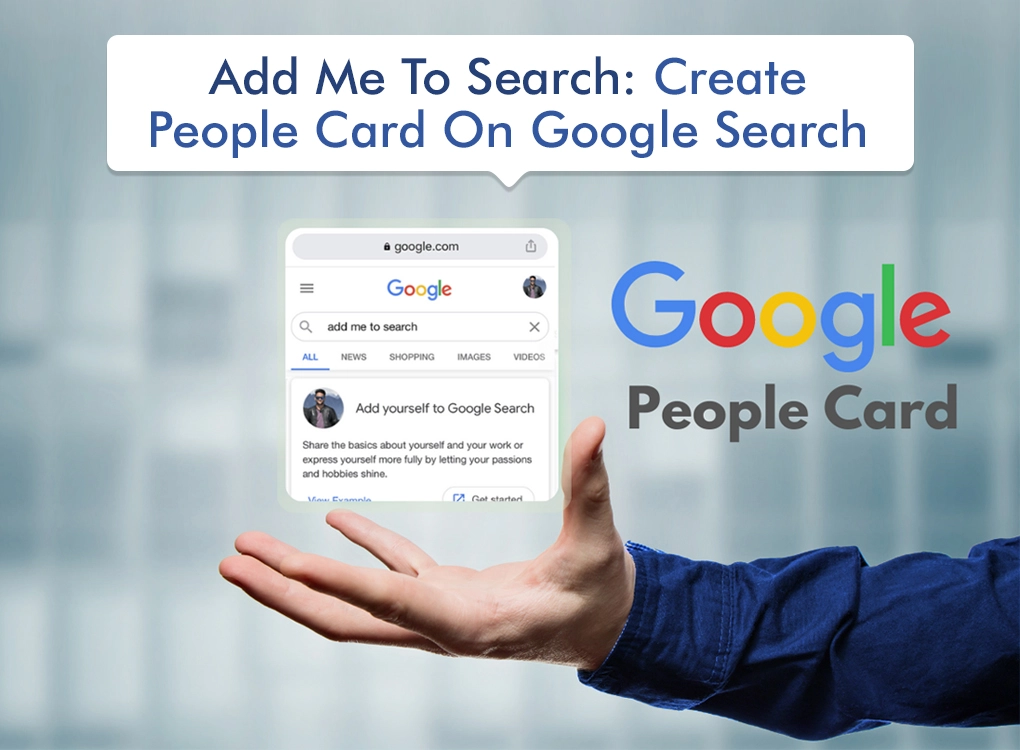
For those seeking a straightforward way to add me to search in Google, Google People Cards stand out. Launched in regions like India and expanding globally, this feature lets you craft a concise virtual business card that displays directly in search results.
Picture it as a spotlight on your identity: It includes essentials like your photo, bio, job title, and links, making you instantly findable. Unlike scattered social profiles, it’s centralized and Google-optimized, often appearing above other results for name-based searches.
Benefits of Using a Google People Card
Opting for a People Card to add me to search in Google offers several advantages. It boosts visibility by claiming prime real estate in results, providing quick insights into your background. This snapshot can convey professionalism in seconds.
Moreover, it’s user-friendly no coding required and enhances credibility, as it signals you’re proactive about your online image. For freelancers or job seekers, it can lead to direct inquiries via included contact info. Plus, it’s free and editable, allowing adaptations as your career evolves.
Step-by-Step Instructions to Create Your Google People Card
Creating a card to add me to search in Google is mobile-centric and straightforward. Here’s how:
- Prepare Essentials: Ensure you have a personal Google Account with Web & App Activity enabled. Use a mobile device for best results.
- Initiate the Search: Open the Google app or browser on your phone and type “add me to search” or your full name.
- Locate the Option: Look for the “Add yourself to Google Search” button at the top. Click “Get started.”
- Complete the Form: Input details carefully:
- Upload a clear, professional photo.
- Confirm your name from your account.
- Specify your location for local relevance.
- Write an engaging “About” section (150-200 words) incorporating keywords like your profession.
- Add occupation, employer, education, and hometown.
- Link your website and social handles (e.g., LinkedIn, X).
- Optionally include email or phone for contacts.
- Review and Publish: Preview the card, make tweaks, and save. Google reviews it briefly before it goes live.
Pro tip: Use high-resolution images and keep text concise for mobile users.
Tips for Optimizing Your Google People Card
To maximize your card’s impact after adding me to search in Google, focus on refinement. Select a photo that’s approachable yet professional studies show smiling faces increase engagement by 20%.
In the “About” area, weave in search terms naturally, like “experienced digital marketer in New York.” Maintain uniformity with other profiles to avoid algorithmic confusion. Regularly refresh content to reflect updates, such as new certifications.
Also, prioritize quality links: Include only active, relevant profiles to build authority. Track performance via Google Search Console for insights on impressions.
Alternative Methods to Boost Your Google Presence
While People Cards are effective, diversify to fully add me to search in Google. Combine them with other tactics for robust coverage.
Building a Personal Website
A custom site acts as your online headquarters. It allows in-depth storytelling, from portfolios to blogs, giving Google ample content to index.
Start by securing a domain (yourname.com via registrars like GoDaddy). Choose user-friendly builders: WordPress for flexibility, Wix for simplicity. Essential pages include Home, About, Services/Portfolio, and Contact. Optimize with SEO plugins, ensuring fast loading and mobile responsiveness.
Content ideas: Publish articles on industry trends, embedding your name and keywords for better ranking.
Enhancing Your Social Media Profiles
Social platforms often dominate name searches, so polish them to add me to search in Google. On LinkedIn, complete all sections with a headline like “Marketing Expert | Helping Brands Grow.” Use keywords in summaries and experiences.
For X (formerly Twitter), craft a bio with searchable phrases and post regularly. On Instagram or Facebook, set profiles to public, add bios with links, and use hashtags. Cross-promote content to encourage shares, which signal relevance to Google.
Utilizing Online Directories and Listings
Join niche directories to expand reach. For professionals, sites like Crunchbase or industry associations offer public listings. Creative fields? Try Behance or Dribbble. General options include About.me for simple profiles.
These create backlinks, boosting authority. Ensure details match across all for cohesive branding.
Personal SEO Strategies: Elevate Your Discoverability
Personal SEO refines how you add me to search in Google. Consistency is key: Use the same name format everywhere (e.g., “John A. Doe”).
Integrate keywords thoughtfully think “add me to search in Google” plus modifiers like location or niche. Produce content: Blog posts, videos, or podcasts that solve problems in your field.
Earn backlinks by guest writing or collaborating. Tools like Ahrefs (free tier) help track progress. Focus on user intent: What would searchers want? Deliver value to rank higher.
Avoiding Common Pitfalls in Building Your Online Profile
Steer clear of errors that hinder adding me to search in Google. Inconsistencies in details fragment your presence. Private settings block crawlers make profiles public where appropriate.
Outdated info erodes trust; schedule quarterly reviews. Over-optimizing with keywords looks spammy aim for natural flow. Rushing for results? Patience pays; aggressive tactics can lead to penalties.
Timeline for Seeing Results: What to Expect
After efforts to add me to search in Google, visibility timelines vary. People Cards may appear in hours to days. Websites take weeks to months for full indexing, depending on crawl frequency.
Factors influencing speed: Content quality, backlinks, and domain age. Use Google’s “site:yourdomain.com” search to check indexing status.
How to Monitor Your Google Search Presence
Regularly audit to ensure you’ve successfully added me to search in Google. Use incognito mode for unbiased results. Search variations: Name alone, with job, or location.
Tools like Google Alerts notify you of new mentions. Search Console provides data on queries driving traffic. Analyze and adjust based on what’s working.
Advanced Tips for Long-Term SEO Success
For sustained growth beyond basic adding me to search in Google, go deeper. Implement schema markup on your site for rich snippets. Engage in content marketing: Create evergreen guides that attract links.
Leverage video SEO on YouTube, as Google owns it. Build an email list for direct outreach. Stay updated with algorithm changes via resources like Search Engine Journal.
Case Studies: Real-World Examples of Success
Consider Sarah, a graphic designer who used a People Card and LinkedIn optimization to add me to search in Google. Within a month, client inquiries doubled.

Or Mike, an IT consultant: By building a WordPress site with keyword-rich blogs, he ranked on page one for his name + “cybersecurity expert,” landing a major contract.
These stories highlight that consistent, strategic efforts yield tangible results.
Conclusion: Take Charge of Your Digital Identity
Mastering how to add me to search in Google empowers you to shape perceptions and seize opportunities. From Google People Cards to comprehensive personal SEO, the steps outlined here provide a roadmap for beginners and pros alike.
Don’t wait start today by creating your card or auditing your profiles. At HelpMeInSEO.com, we’re here to guide you further with expert tips and services. Your online presence is your future; build it wisely.
Frequently Asked Questions
Q1: Does creating a Google People Card cost anything?
A: No, it’s entirely free to set up and update your card.
Q2: Is a personal website necessary for Google visibility?
A: It’s not mandatory, but it greatly enhances control and depth compared to just social profiles or cards.
Q3: How do I stand out if others share my name?
A: Incorporate unique identifiers like your middle name, expertise, or city in profiles and content.
Q4: Can I erase my info from Google if needed?
A: Absolutely – delete cards, privatize profiles, or use Google’s removal requests for specific content.
Q5: How often should I update my Google People Card?
A: Review and update every 3-6 months or after major career changes, like a new job or certification, to keep it relevant.
Q6: Can I create a Google People Card from a desktop?
A: Currently, Google People Cards are primarily set up via mobile devices. Use the Google app or a mobile browser for the best experience.
Q7: What if my Google People Card doesn’t show up in search results?
A: It may take a few hours to days for indexing. Ensure your card is public and check for errors in setup. If issues persist, verify Web & App Activity is enabled.
Q8: Are there any risks to sharing my contact info on a People Card?
A: Sharing email or phone is optional. Only include what you’re comfortable with, and use professional contact methods to maintain privacy.
Q9: Can I use a Google People Card for my business instead of myself?
A: People Cards are designed for individuals. For businesses, consider Google My Business for a similar effect.
Q10: How do I know if my website is indexed by Google?
A: Search “site:yourdomain.com” in Google. If pages appear, they’re indexed. Use Google Search Console for detailed insights.

Leave a Comment